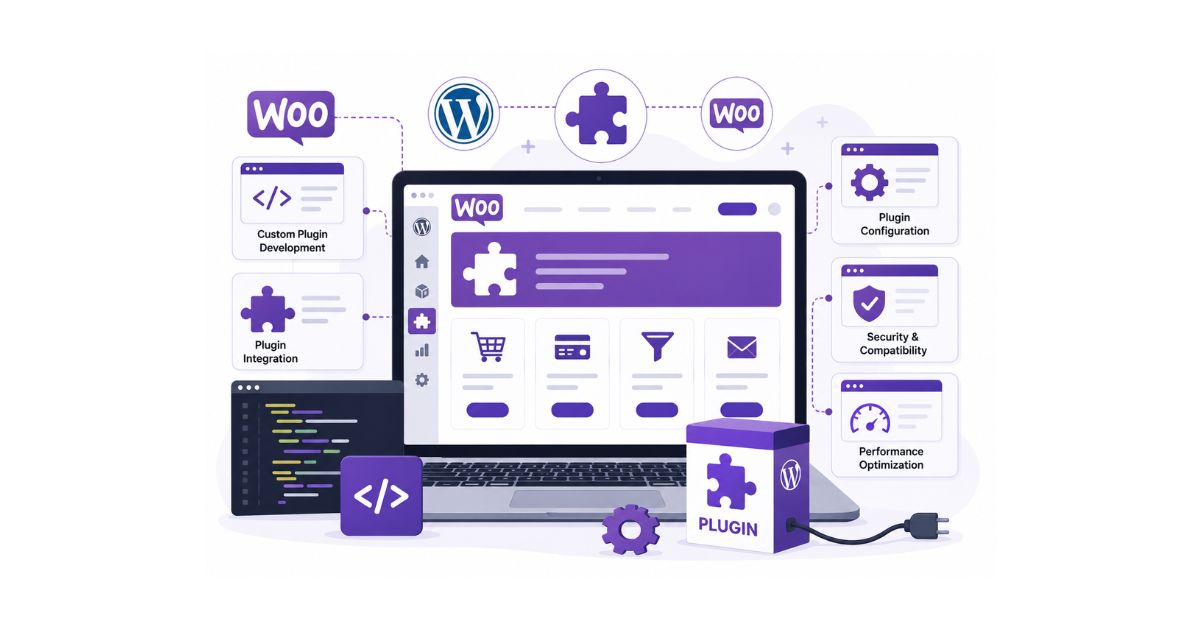
Custom WooCommerce plugin development is the process of creating tailored plugins that add unique functionality to a WooCommerce store. Businesses use custom plugins to automate operations, improve customer experiences, integrate third-party systems, and support ecommerce features that standard plugins cannot provide.
Key Takeaways
- Custom WooCommerce plugins are built to solve specific business challenges.
- They offer greater flexibility than pre-built plugins.
- Businesses can automate workflows and improve operational efficiency.
- Custom plugins help reduce dependency on multiple third-party solutions.
- Proper development improves scalability, security, and performance.
- Custom WooCommerce plugins support long-term ecommerce growth.
WooCommerce powers millions of online stores worldwide because of its flexibility and extensive plugin ecosystem. From payment gateways and shipping calculators to marketing tools and inventory management systems, plugins help businesses extend WooCommerce functionality without building everything from scratch.
However, as ecommerce businesses grow, they often encounter challenges that existing plugins cannot fully solve.
Some businesses require specialized checkout experiences. Others need advanced inventory workflows, custom pricing systems, loyalty programs, or integrations with internal business software. In these situations, relying on multiple third-party plugins can create compatibility issues, performance problems, and unnecessary complexity.
Custom WooCommerce plugin development provides a solution.
Instead of forcing your business to adapt to existing software, custom plugins allow WooCommerce to work according to your specific operational requirements. Whether you’re improving customer experiences, automating repetitive tasks, or integrating critical business systems, custom plugins help create a more scalable and efficient ecommerce environment.
This guide explains the benefits, development process, use cases, costs, challenges, and best practices of custom WooCommerce plugin development.
What Is Custom WooCommerce Plugin Development?
Custom WooCommerce plugin development involves designing, building, testing, and maintaining plugins created specifically for a WooCommerce store’s unique requirements.
Unlike generic plugins available through the WordPress plugin repository, custom plugins are built to support business-specific functionality.
Custom plugins may be used for:
- Checkout customization
- Product personalization
- Inventory automation
- Customer management
- ERP integrations
- CRM integrations
- Subscription systems
- Reporting dashboards
These plugins provide businesses with complete control over functionality and workflows.
WooCommerce Plugins vs WooCommerce Themes
Many store owners confuse plugins and themes.
Understanding the difference is important before investing in development.
| Feature | WooCommerce Theme | WooCommerce Plugin |
| Purpose | Controls design | Adds functionality |
| Focus | Appearance and layout | Features and operations |
| User Experience | Frontend | Frontend and backend |
| Examples | Store design | Payment systems |
While WooCommerce store setup focuses on building and launching an online store, custom plugin development helps extend functionality as business requirements evolve.
Why Businesses Need Custom WooCommerce Plugins
Businesses choose custom WooCommerce plugin development when existing plugins cannot fully support their operational requirements.
Unique Business Processes
Every business has different workflows.
Custom plugins can support:
- Industry-specific requirements
- Custom fulfillment processes
- Specialized customer journeys
Workflow Automation
Automation reduces repetitive tasks and improves efficiency.
Examples include:
- Automated inventory updates
- Customer notifications
- Order processing workflows
- Reporting automation
Better Customer Experience
Custom functionality helps businesses deliver more personalized shopping experiences.
Examples:
- Product configurators
- Dynamic pricing
- Personalized offers
- Membership systems
Scalability
As stores grow, custom plugins can evolve alongside business requirements.
Competitive Advantage
Unique functionality helps businesses differentiate themselves from competitors.
Types of WooCommerce Plugins
WooCommerce supports many plugin categories.
| Plugin Type | Purpose |
| Payment Plugins | Process transactions |
| Shipping Plugins | Manage deliveries |
| Marketing Plugins | Promotions and campaigns |
| SEO Plugins | Search visibility |
| Security Plugins | Website protection |
| Inventory Plugins | Stock management |
| Analytics Plugins | Performance tracking |
| Custom Plugins | Unique business functionality |
Custom plugins become valuable when standard solutions no longer meet business requirements.
Benefits of Custom WooCommerce Plugin Development
Custom plugins provide flexibility, performance, ownership, and long-term scalability.
Tailored Functionality
Businesses receive features specifically designed around their requirements.
Reduced Plugin Dependency
Instead of installing multiple third-party plugins, businesses can consolidate functionality into a single solution.
Better Website Performance
Custom plugins often perform better because they include only the features required by the business.
Improved Security
Custom development reduces reliance on unknown third-party code.
Greater Scalability
Custom solutions can grow alongside the business.
Full Ownership
Businesses maintain complete control over functionality, updates, and future enhancements.
Common Use Cases for Custom WooCommerce Plugins
Many businesses invest in custom plugin development to solve specific challenges.
Custom Checkout Experiences
Businesses often need specialized checkout flows.
Examples:
- Multi-step checkout
- Wholesale checkout
- Industry-specific forms
Product Customization Features
Allow customers to personalize products before purchase.
Examples:
- Product engraving
- Custom text fields
- Design options
Subscription Management
Custom subscription systems can support recurring revenue models.
Loyalty Programs
Reward systems help improve customer retention.
CRM Integrations
Connect WooCommerce with:
- Customer databases
- Sales software
- Marketing platforms
ERP Integrations
Custom plugins help synchronize business operations.
Examples:
- Inventory
- Accounting
- Procurement
- Fulfillment
Multi-Vendor Marketplaces
Support multiple vendors within a single WooCommerce environment.
B2B Ecommerce Features
Examples include:
- Custom pricing
- Bulk ordering
- Wholesale catalogs
- Account-based pricing
The Custom WooCommerce Plugin Development Process
Successful WooCommerce plugin development follows a structured process that focuses on planning, development, testing, and long-term support.
Step 1: Requirement Discovery
Identify:
- Business goals
- User requirements
- Workflow challenges
- Integration needs
Step 2: Planning and Architecture
Developers define:
- Plugin structure
- Database requirements
- Integration architecture
Step 3: Development
The plugin functionality is developed according to project requirements.
Step 4: Testing
Testing includes:
- Functionality testing
- Compatibility testing
- Performance testing
- Security testing
Step 5: Deployment
The plugin is installed and configured.
Step 6: Ongoing Maintenance
Regular updates ensure compatibility and performance.
Technologies Used in WooCommerce Plugin Development
Several technologies support WooCommerce plugin development.
| Technology | Purpose |
| PHP | Core plugin functionality |
| WordPress Hooks | Extend functionality |
| WooCommerce APIs | Store interactions |
| MySQL | Data storage |
| REST API | External integrations |
| JavaScript | Interactive features |
Businesses do not need deep technical knowledge, but understanding these technologies helps during project planning.
Need a Custom WooCommerce Plugin?
Build custom WooCommerce functionality designed around your unique business requirements, customer experiences, and growth goals.
Custom WooCommerce Plugin Development Cost Factors
The cost of custom WooCommerce plugin development depends on complexity, integrations, functionality, and ongoing support requirements.
Major Cost Factors
- Plugin complexity
- Number of features
- API integrations
- Security requirements
- User interface requirements
- Maintenance needs
Businesses should evaluate plugin investments as part of their overall ecommerce website development cost strategy.
The goal should be creating scalable solutions that support future growth.
Common WooCommerce Plugin Development Challenges
Custom plugin projects often face challenges.
Compatibility Issues
Plugins must work alongside themes and other extensions.
Performance Problems
Poorly developed plugins can affect website speed.
Security Risks
Plugins must follow secure development practices.
Update Management
WooCommerce and WordPress updates require ongoing plugin maintenance.
Integration Complexity
Connecting multiple systems can increase project complexity.
WooCommerce Plugin Security Best Practices
Security should be a priority throughout development.
Follow WordPress Coding Standards
Proper coding practices reduce vulnerabilities.
Validate User Inputs
Prevent unauthorized or malicious actions.
Limit Data Access
Store only necessary information.
Monitor Plugin Activity
Regular monitoring helps identify unusual behavior.
Keep Plugins Updated
Updates help maintain compatibility and security.
Custom Plugin vs Pre-Built Plugin
Many businesses compare custom development with existing plugin solutions.
| Feature | Custom Plugin | Pre-Built Plugin |
| Flexibility | High | Limited |
| Ownership | Full | Limited |
| Customization | Extensive | Restricted |
| Performance | Better | Variable |
| Scalability | High | Moderate |
| Initial Cost | Higher | Lower |
The right choice depends on business goals, budget, and long-term requirements.
Future Trends in WooCommerce Plugin Development
The ecommerce landscape continues evolving.
Artificial Intelligence
AI-powered plugins support:
- Product recommendations
- Customer service
- Sales forecasting
- Personalization
Workflow Automation
Businesses increasingly automate operational tasks.
Headless Commerce
Headless architectures provide greater flexibility and performance.
Advanced Analytics
Custom reporting tools help businesses make informed decisions.
Personalized Shopping Experiences
Customer expectations continue driving ecommerce innovation.
Expert Insight
Many businesses initially rely on multiple third-party plugins to add functionality quickly. While this approach works during the early stages, growing stores often experience plugin conflicts, performance issues, and rising subscription costs. Custom WooCommerce plugin development provides greater control, better performance, and functionality tailored specifically to business objectives.
Common Questions About WooCommerce plugin development
What is custom WooCommerce plugin development?
Custom WooCommerce plugin development involves creating plugins specifically designed for a store’s unique business requirements.
Why do businesses need custom WooCommerce plugins?
Businesses use custom plugins to automate processes, improve customer experiences, and support specialized functionality.
How much does custom WooCommerce plugin development cost?
Costs depend on complexity, integrations, features, and ongoing maintenance requirements.
Can custom WooCommerce plugins integrate with external systems?
Yes. Custom plugins can connect WooCommerce with CRM, ERP, inventory, accounting, and marketing platforms.
Are custom WooCommerce plugins secure?
When developed properly and maintained regularly, custom plugins can provide strong security and reliability.
Frequently Asked Questions
Themes control design, while plugins add functionality and business features.
Yes. Many businesses create plugins specifically for their own stores.
Custom plugins often perform better because they include only the required functionality.
Timelines vary depending on complexity and project requirements.
Yes. They can be designed to support long-term business growth.
Ready to Build a Custom WooCommerce Plugin?
Enhance your WooCommerce store with custom plugin development designed to improve functionality, efficiency, automation, and customer experience.