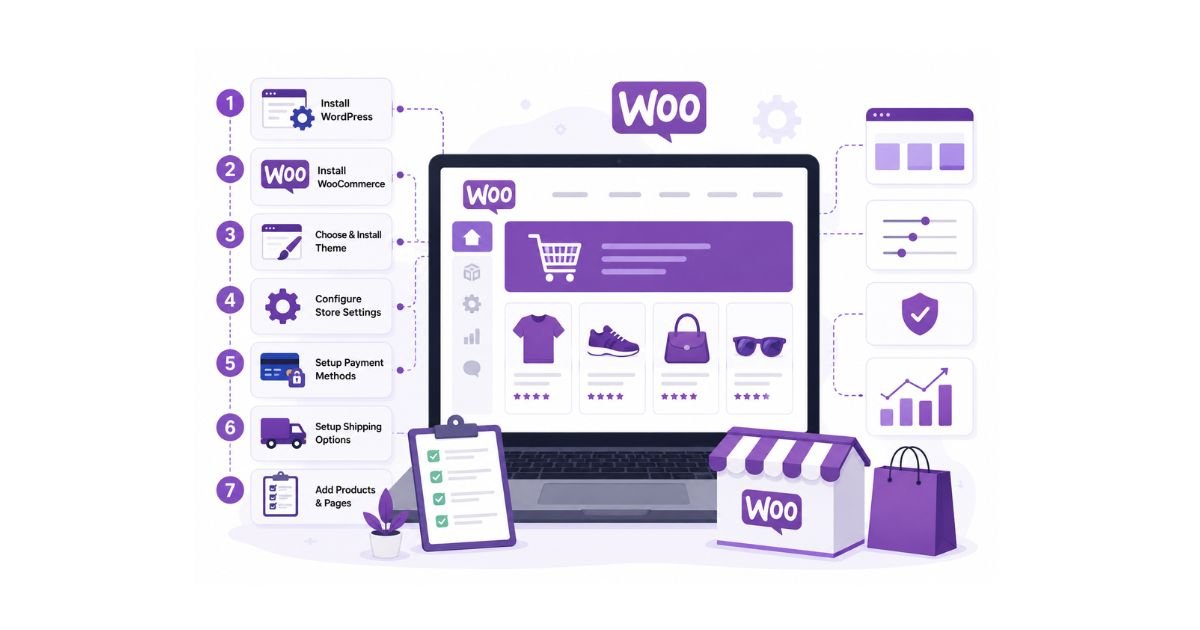
Setting up WooCommerce involves choosing a domain name and hosting provider, installing WordPress and WooCommerce, configuring store settings, adding products, setting up payments and shipping, optimizing your website, and preparing your store for launch. A properly configured WooCommerce store creates a strong foundation for ecommerce growth, customer satisfaction, and long-term business success.
Key Takeaways
- WooCommerce is one of the most flexible ecommerce platforms available for WordPress websites.
- A successful store setup begins with selecting the right hosting, domain, and security infrastructure.
- Proper configuration of payments, shipping, taxes, and products is essential before launch.
- Choosing the right theme and plugins can improve both user experience and store performance.
- Testing your website before launch helps prevent customer-facing issues.
- Ongoing optimization and maintenance are just as important as the initial setup.
Launching an ecommerce store is an exciting step for any business, but success depends on more than simply installing a plugin and adding products. A well-planned WooCommerce setup helps ensure your online store is secure, scalable, user-friendly, and ready to support long-term growth.
WooCommerce has become a popular choice for businesses because it combines the flexibility of WordPress with powerful ecommerce functionality. Whether you’re selling physical products, digital downloads, subscriptions, or services, WooCommerce provides the tools needed to build and manage a professional online store.
For businesses entering the world of ecommerce development, WooCommerce offers a flexible and scalable foundation for long-term growth.
However, many businesses rush through the setup process and later encounter problems related to performance, security, checkout functionality, or user experience. Taking the time to properly configure your WooCommerce store from the beginning can save significant time and resources in the future.
This step-by-step WooCommerce setup guide explains everything you need to know to launch your store successfully in 2026.
Why WooCommerce Is a Popular Choice for Ecommerce
Before diving into the setup process, it helps to understand why businesses choose WooCommerce.
Flexibility and Customization
WooCommerce allows businesses to customize nearly every aspect of their online store, from product pages and checkout experiences to shipping rules and customer journeys.
Complete Ownership
Unlike some hosted ecommerce platforms, WooCommerce gives businesses full ownership of their website, hosting environment, and customer data.
SEO-Friendly Foundation
Since WooCommerce runs on WordPress, businesses can take advantage of strong content marketing and search optimization opportunities.
Scalability
WooCommerce can support small online stores as well as large ecommerce operations with thousands of products.
Extensive Plugin Ecosystem
Businesses can extend functionality through plugins for:
- Marketing automation
- Security
- Shipping
- Analytics
- Customer support
- Performance optimization
For a deeper understanding of the platform, businesses should also explore WooCommerce development and how it supports long-term ecommerce growth.
What You Need Before Setting Up WooCommerce
Before installing WooCommerce, businesses should prepare several essential components to ensure a smooth setup process.
Requirements Checklist
- Domain name
- Hosting provider
- SSL certificate
- WordPress installation
- Business information
- Product details
- Payment account information
- Shipping policies
Preparing these items in advance makes the setup process significantly easier.
WooCommerce Setup Process Overview
The setup process can be divided into several key stages.
| Step | Purpose |
| Domain Registration | Create your online identity |
| Hosting Setup | Provide website infrastructure |
| WordPress Installation | Build the website foundation |
| WooCommerce Installation | Add ecommerce functionality |
| Store Configuration | Configure operations |
| Product Setup | Add inventory |
| Payment Setup | Accept customer payments |
| Shipping Setup | Manage deliveries |
| Theme Customization | Improve design and branding |
| Testing & Launch | Prepare for customers |
This setup guide focuses on the implementation stage of the broader ecommerce website development process, helping businesses prepare their stores for launch.
Step 1: Choose a Domain Name
A domain name is the web address customers use to access your online store.
Your domain should be:
- Easy to remember
- Easy to spell
- Relevant to your business
- Professional and brand-focused
Domain Name Best Practices
- Keep it short and simple.
- Avoid numbers and special characters.
- Choose a trusted domain extension.
- Consider future business growth.
Your domain name becomes a key part of your brand identity, so selecting the right one is important.
Step 2: Select WooCommerce Hosting
Hosting affects your store’s performance, security, speed, and reliability.
Many ecommerce issues can be traced back to poor hosting decisions.
Hosting Options Comparison
| Hosting Type | Best For |
| Shared Hosting | Small starter stores |
| VPS Hosting | Growing businesses |
| Managed WooCommerce Hosting | Serious ecommerce operations |
| Cloud Hosting | High-growth stores |
What to Look for in Hosting
- Fast server performance
- Automatic backups
- SSL support
- WooCommerce compatibility
- Security protection
- Reliable uptime
Quality hosting contributes directly to customer experience and conversion rates.
Step 3: Install WordPress
WordPress provides the content management foundation required for WooCommerce.
Most hosting providers offer one-click WordPress installation.
After installation:
- Set your site title
- Configure admin access
- Update permalink settings
- Remove unnecessary default content
WordPress gives businesses complete control over content and ecommerce management.
Step 4: Install WooCommerce
WooCommerce can be installed directly from the WordPress plugin repository.
- Installation Process
- Log into WordPress.
- Navigate to Plugins.
- Search for WooCommerce.
- Install and activate the plugin.
- Launch the setup wizard.
The setup wizard helps configure:
- Store location
- Currency
- Industry information
- Product types
This is the point where your website begins transforming into a fully functional online store.
Step 5: Configure Store Settings
Store settings control how your WooCommerce website operates.
Essential Settings
- Store address
- Currency
- Tax configuration
- Customer accounts
- Email notifications
Configuration Checklist
| Setting | Importance |
| Currency | High |
| Taxes | High |
| Accounts | High |
| Emails | Medium |
| Store Location | High |
Accurate settings reduce future operational issues.
Step 6: Add Products
Products are the foundation of your ecommerce business and should be configured carefully.
Product Information to Include
- Product name
- Detailed description
- Images
- Pricing
- SKU
- Categories
- Inventory information
Product Optimization Tips
- Use high-quality images.
- Write unique product descriptions.
- Organize products into logical categories.
- Highlight key product benefits.
Well-optimized product pages improve both conversions and search visibility.
Step 7: Set Up Payment Gateways
Payment gateways allow customers to complete purchases securely.
Popular payment methods include:
- Credit cards
- Debit cards
- Digital wallets
- Bank transfers
- Regional payment solutions
Payment Setup Best Practices
- Offer multiple payment options.
- Test transactions before launch.
- Enable secure checkout experiences.
- Clearly communicate accepted payment methods.
Customers are more likely to complete purchases when payment options are convenient and trustworthy.
Step 8: Configure Shipping Options
Shipping settings determine how products are delivered and how shipping costs are calculated.
Common Shipping Methods
- Flat-rate shipping
- Free shipping
- Local delivery
- Real-time carrier rates
Shipping Tips
- Be transparent about shipping costs.
- Offer free shipping where possible.
- Define delivery expectations clearly.
Shipping policies play a major role in customer satisfaction.
Step 9: Choose a WooCommerce Theme
Your theme determines how customers experience your store visually and functionally.
What Makes a Good WooCommerce Theme?
- Mobile responsiveness
- Fast loading speeds
- Clean navigation
- Customization flexibility
- WooCommerce compatibility
Free vs Premium Themes
| Feature | Free Theme | Premium Theme |
| Cost | Lower | Higher |
| Customization | Limited | Extensive |
| Support | Basic | Dedicated |
| Features | Standard | Advanced |
The right theme supports branding, usability, and conversions.
Step 10: Install Essential WooCommerce Plugins
Plugins extend WooCommerce functionality and improve store management.
Recommended Plugin Categories
SEO Plugins
Help improve search visibility.
Security Plugins
Protect customer and business data.
Performance Plugins
Improve website speed.
Analytics Plugins
Track customer behavior and store performance.
Backup Plugins
Protect your website from unexpected issues.
Install only trusted plugins and avoid unnecessary additions that may affect performance.
Need Help Setting Up Your WooCommerce Store?
Whether you’re launching your first ecommerce website or upgrading an existing store, professional WooCommerce setup services can help you create a secure, scalable, and conversion-focused online business.
How Much Does WooCommerce Setup Cost?
WooCommerce setup costs vary depending on hosting, themes, plugins, customization requirements, and business goals.
Common Cost Factors
- Domain registration
- Hosting
- Premium themes
- Paid plugins
- Custom development
- Ongoing maintenance
Businesses planning larger stores should also evaluate their overall ecommerce website development cost before launching.
The goal should be balancing budget, performance, and scalability rather than focusing solely on the lowest cost option.
How Long Does WooCommerce Setup Take?
The timeline depends on store complexity.
| Store Type | Estimated Setup Time |
| Basic Store | 1-3 Days |
| Small Business Store | 3-7 Days |
| Custom Store | 2-4 Weeks |
| Enterprise Store | Several Weeks |
Proper planning can significantly reduce setup time.
Common WooCommerce Setup Mistakes
Many businesses encounter problems because of avoidable setup errors.
Choosing Cheap Hosting
Low-quality hosting often creates speed and reliability issues.
Ignoring Mobile Optimization
Mobile shoppers represent a significant portion of ecommerce traffic.
Skipping SSL Certificates
SSL certificates help protect customer data.
Installing Too Many Plugins
Too many plugins can create conflicts and reduce performance.
Using Low-Quality Product Images
Visual presentation affects purchasing decisions.
Ignoring Website Speed
Slow websites often experience higher bounce rates.
Poor Navigation Structure
Customers should easily find products.
Not Testing Checkout
Checkout issues can directly impact revenue.
Weak Security Measures
Security should be a priority from day one.
Launching Too Early
Take time to thoroughly test the store before launch.
WooCommerce Pre-Launch Checklist
Before making your store public, review the following checklist.
Technical Checklist
- Website loads correctly
- Mobile responsiveness verified
- Product pages tested
- Checkout tested
Security Checklist
- SSL enabled
- Security plugin installed
- Admin credentials secured
SEO Checklist
- Meta titles configured
- Product descriptions optimized
- URLs reviewed
Conversion Checklist
- Call-to-action buttons tested
- Payment gateways verified
- Contact information visible
WooCommerce Post-Launch Checklist
Successful ecommerce stores continue improving after launch.
Post-Launch Tasks
- Set up analytics tracking
- Connect Search Console
- Monitor website performance
- Review customer feedback
- Implement email marketing
- Schedule regular backups
Post-launch optimization helps businesses maximize growth opportunities.
Expert Tips for a Successful WooCommerce Launch
Focus on User Experience
Simple navigation improves customer satisfaction.
Prioritize Mobile Shoppers
Mobile-first design should be a priority.
Optimize Website Speed
Fast websites support conversions and SEO.
Keep Plugins Organized
Use only essential plugins.
Monitor Store Performance
Regular reviews help identify opportunities for improvement.
Expert Insight
Many businesses treat WooCommerce setup as a one-time task, but successful ecommerce stores view it as the beginning of an ongoing optimization process. The strongest stores focus on performance, security, customer experience, and continuous improvement from the very beginning.
People Also Ask
How do I set up WooCommerce for the first time?
Install WordPress, activate WooCommerce, configure settings, add products, set up payments, and launch your store.
Is WooCommerce free to use?
WooCommerce is free to install, although hosting, premium themes, plugins, and customization may involve costs.
How long does it take to set up WooCommerce?
A basic store can often be set up within a few days, while larger stores may require several weeks.
Do I need coding skills to set up WooCommerce?
No. Most WooCommerce setup tasks can be completed without coding experience.
Is WooCommerce good for small businesses?
Yes. WooCommerce is widely used by startups, small businesses, and growing ecommerce brands.
Frequently Asked Questions
WooCommerce is used to create and manage ecommerce stores on WordPress.
Yes. WooCommerce supports both physical and digital products.
Yes. WooCommerce allows extensive customization through themes, plugins, and custom development.
Yes. WooCommerce supports a wide range of payment solutions.
Yes. Properly optimized WooCommerce stores can support significant growth.
Ready to Launch Your WooCommerce Store?
Build a secure, scalable, and high-performing ecommerce website with professional WooCommerce setup services tailored to your business goals.